

23 Feb How to Find Teacher Bags with Laptop Compartments That Protect Your Tech
Teachers today carry more technology than ever before. Laptops, tablets, charging cables, and other devices have become essential classroom tools. However, carrying expensive electronics requires more than just tossing them into any bag. You need proper protection to prevent damage from bumps, drops, and daily wear and tear.
Finding the right bag means understanding what features actually protect your technology while still meeting your needs as an educator. This guide will help you navigate the options and choose a bag that keeps your devices safe without sacrificing functionality or style.
Why Proper Laptop Protection Matters for Teachers
Your laptop contains lesson plans, student records, grades, and countless hours of work. Additionally, these devices cost hundreds or thousands of dollars to replace. Therefore, protecting them should be a top priority when selecting a carrying bag.
Teachers face unique challenges when transporting technology. You’re constantly moving between classrooms, meetings, and home. Your bag gets set down on floors, squeezed into car trunks, and jostled in crowded hallways. Each of these situations poses a risk to unprotected electronics.
Furthermore, weather presents another concern. Rain, snow, and humidity can damage electronics quickly. A quality bag with proper padding and weather resistance shields your devices from these environmental threats.
The right protection also extends the life of your technology. When your laptop is cushioned and secure, it experiences less stress from daily transport. This means fewer repairs and a longer lifespan for your investment.
Understanding What Makes a Compartment Truly Protective
Not all laptop compartments offer the same level of protection. Many bags claim to be laptop-friendly but provide minimal actual cushioning. Understanding the key protective features helps you separate marketing claims from genuine protection.
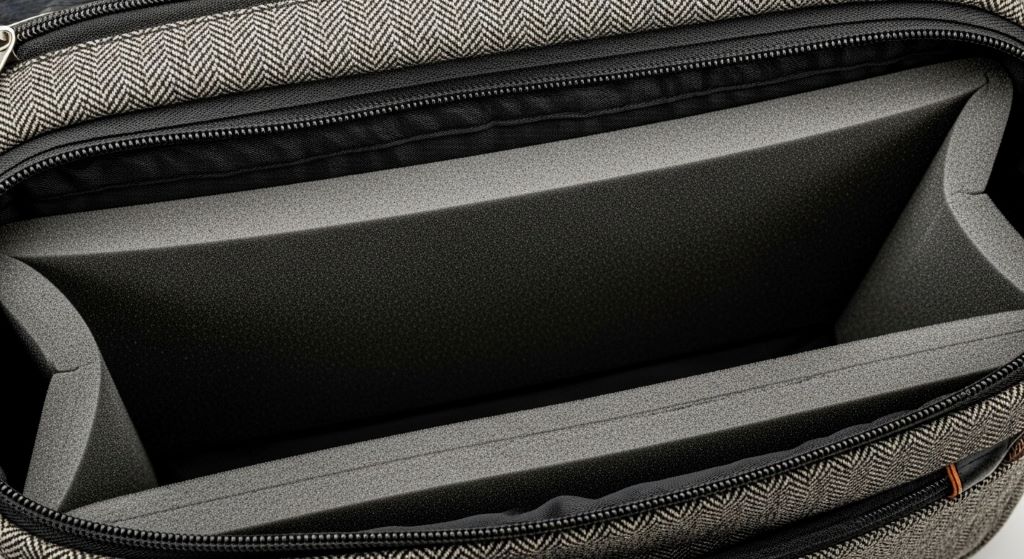
Padded laptop compartments should have cushioning on all sides, not just the back panel. The bottom, sides, and even the opening area need protection because drops and impacts can come from any direction. Look for at least half an inch of padding material surrounding the laptop space.
The padding material itself matters significantly. Memory foam, EVA foam, and high-density polyethylene all provide excellent protection. These materials absorb impact and distribute force across a wider area, preventing damage to your device. Thin, flimsy padding that you can easily compress with your fingers won’t protect much.
Suspension systems represent the gold standard in laptop protection. These designs suspend the laptop compartment away from the bag’s exterior walls. If the bag hits the ground or bumps into something, the outer shell absorbs the impact before it reaches your device.
Secure closures keep your laptop from sliding out during transport. Look for compartments that close with zippers, magnetic snaps, or Velcro straps. An open compartment might seem convenient, but it leaves your laptop vulnerable to falling out if your bag tips over.
Essential Features Beyond Basic Padding
While cushioning is crucial, other features contribute to comprehensive device protection. A well-designed bag considers multiple aspects of keeping your technology safe.
Water-resistant materials protect against unexpected spills and weather. Even if you’re careful, accidents happen. A student might knock over a water bottle near your bag, or you might get caught in unexpected rain. Water-resistant fabric and coated zippers provide valuable insurance against these situations.
Separate compartments prevent scratching and damage from other items. Keys, pens, and other sharp objects can scratch your laptop screen or damage ports. Dedicated pockets keep these items away from your electronics.
Reinforced bottoms prevent your laptop from hitting the ground when you set your bag down. Many bags have thin bottoms that compress under weight, leaving little cushioning between your device and hard surfaces. A rigid, reinforced base provides an extra layer of protection.
Interior straps or sleeves hold your laptop in place. Movement inside the bag creates opportunities for damage. Straps that secure your device prevent it from shifting and banging against other items during transport.
Size matters more than many people realize. A compartment that’s too large allows your laptop to move around, while one that’s too tight makes insertion and removal difficult and risky. Measure your laptop dimensions before shopping to ensure a proper fit.
Choosing the Right Style for Your Teaching Needs
Teachers need bags that protect technology while accommodating books, papers, supplies, and personal items. The style you choose should reflect your daily routine and what you typically carry.
A teacher laptop tote offers professional appearance and easy access. These bags typically feature a structured design with handles and sometimes a shoulder strap. They work well if you carry your bag short distances and don’t need hands-free transport. Totes often provide quick access to materials, making them convenient for busy teachers.
Backpack-style bags distribute weight evenly across both shoulders. This design works better if you walk longer distances, carry heavy loads, or experience back or shoulder pain. Modern laptop backpacks no longer look juvenile. Many feature sophisticated designs appropriate for professional settings.
Messenger bags sit comfortably across your body and allow quick access to contents. They work well for teachers who want something between a backpack and a tote. However, they distribute weight unevenly, which can cause discomfort during extended carrying.
Rolling bags eliminate carrying weight entirely but lack flexibility in some environments. Stairs, crowded hallways, and rough terrain make rolling bags impractical. Consider your school’s layout and where you typically need to take your bag.
Evaluating Build Quality and Durability
Tech-friendly teacher bags must withstand daily use throughout the school year and beyond. Examining construction quality helps you identify bags that will last versus those that will fail after a few months.
Start with the zippers. They’re often the first component to fail on a bag. Look for heavy-duty zippers from reputable manufacturers like YKK. The zipper pulls should feel substantial, not flimsy. Test them several times to ensure they glide smoothly without catching.
Stitching quality indicates overall construction standards. Examine seams closely, looking for tight, even stitches. Reinforced stitching at stress points like handles and strap attachments suggests better durability. Loose threads or uneven stitching signal poor quality control.
Handle and strap construction requires special attention since these components bear your bag’s full weight. Handles should attach at multiple points with reinforcement. Straps need padding for comfort and metal hardware that won’t snap or bend under pressure.
The bag’s material affects both durability and protection. Ballistic nylon, canvas, and polyester blends offer good durability. Check the denier rating, which measures fabric thickness. Higher numbers generally indicate more durable material. Ratings above 600D typically hold up well to daily teacher use.
Finding the Right Size and Capacity
Balancing laptop protection with sufficient storage capacity presents a common challenge. You need enough space for technology plus all the other items teachers carry daily.
Start by listing everything you typically bring to school. Include your laptop, charger, mouse, papers, planner, lunch, water bottle, and any teaching supplies you regularly transport. This inventory helps you determine necessary capacity.
Consider compartment organization carefully. Multiple pockets keep items organized and accessible, but too many small pockets create confusion. Look for a mix of large compartments for books and papers, medium pockets for supplies, and small pockets for items like keys and phones.
Think about future needs as well. You might acquire additional devices or change teaching assignments. A bag with slightly more capacity than you currently need provides flexibility without being overly bulky.
Weight matters when evaluating size. A large bag with lots of features might seem appealing until you realize it weighs several pounds empty. This weight adds to everything else you’re carrying. Lighter materials and streamlined designs help keep total weight manageable.
Testing Protection Features Before Purchase
Whenever possible, physically examine bags before buying. Hands-on evaluation reveals qualities that photos and descriptions can’t convey.
Press on the laptop compartment padding to assess thickness and quality. It should feel substantial and return to its original shape quickly. Inadequate padding feels thin and compresses easily.
Examine the compartment opening to understand how you’ll insert and remove your laptop. The opening should be wide enough to accommodate your device without forcing it. Some bags have narrow openings that make it difficult to avoid scraping your laptop against the zipper or frame.
Test the bag’s weight distribution by loading it with items similar to what you’ll carry. Walk around with it for several minutes to evaluate comfort. Uncomfortable bags cause you to adjust constantly, increasing the risk of drops.
Check accessibility while the bag is full. Can you reach items in various compartments without removing everything? Accessibility affects daily convenience and whether you’ll actually use the organizational features.
Comparing Price Points and Value
Teacher budgets are often tight, making value an important consideration. However, the cheapest option rarely provides adequate protection for expensive electronics.
Budget bags under fifty dollars occasionally offer decent protection, but you must evaluate them carefully. At this price point, compromises are inevitable. Focus on finding options with good padding even if they lack premium materials or extra features.
Mid-range bags between fifty and one hundred fifty dollars often provide the best value for teachers. This price range typically includes quality padding, durable materials, and useful organizational features without luxury pricing.
Premium bags over one hundred fifty dollars offer top-tier protection and durability. They’re worth considering if you carry particularly expensive technology or need a bag to last many years. However, the protection increase over good mid-range options might not justify the cost difference for everyone.
Consider the cost of replacing your laptop when evaluating bag prices. Spending an extra fifty dollars on superior protection makes sense when protecting a thousand-dollar device. The bag is insurance for your technology investment.
Reading Reviews and Learning from Other Teachers
Other educators’ experiences provide valuable insights when choosing a bag. Reviews reveal real-world performance that marketing materials don’t show.
Look for reviews from teachers specifically rather than general users. Teachers have unique needs that differ from students or business professionals. Fellow educators can tell you whether a bag holds up to classroom demands.
Pay attention to long-term reviews rather than immediate impressions. A bag might seem great initially but develop problems after months of use. Reviews written after six months or a year reveal durability issues.
Notice patterns in criticism. If multiple reviewers mention the same problem, it’s likely a genuine design flaw rather than a one-off defect. Common complaints about zipper failures or inadequate padding should raise red flags.
Balance positive and negative feedback. Extremely positive reviews without any criticism might be fake. Similarly, overly negative reviews might reflect unrealistic expectations. Look for balanced perspectives that discuss both strengths and weaknesses.
Maintaining Your Bag for Maximum Protection
Even the best bag requires proper care to maintain protective qualities. Regular maintenance extends your bag’s lifespan and ensures continued protection for your devices.
Clean your bag regularly to prevent dirt buildup that can damage materials and zippers. Most bags can be spot-cleaned with mild soap and water. Check the manufacturer’s cleaning instructions before using harsh chemicals or putting the bag in a washing machine.
Inspect padding periodically for compression or damage. Padding can break down over time, especially in frequently used areas. If you notice significant compression that doesn’t recover, it might be time to replace your bag.
Check zippers and closures for signs of wear. Catching a zipper problem early often means a simple repair prevents complete failure. Many shoe repair shops or tailors can replace broken zippers relatively inexpensively.
Avoid overloading your bag beyond its intended capacity. Excessive weight strains seams, zippers, and padding. Overloading also compresses padding, reducing its protective capability. If you regularly need to carry more than your bag comfortably holds, consider a larger size.
Special Considerations for Different Technology
While laptops receive the most attention, teachers often carry other devices requiring protection. Your bag choice should accommodate all your technology needs.
Tablet compartments work differently than laptop spaces. Tablets are thinner and more vulnerable to bending. Look for rigid compartments or sleeve pockets specifically designed for tablets. Some bags include padded pockets that work for both tablets and e-readers.
Charging cables and accessories need organized storage. Tangled cables are frustrating and can damage ports over time. Bags with cord organizers or small zippered pockets help keep accessories neat and accessible. Additionally, dedicated pockets prevent cables from scratching your devices.
External hard drives and USB drives require protection from impacts. Small padded pouches within your bag protect these items from drops and pressure. Some bags include specialized pockets for small electronics and storage devices.
Document cameras, portable projectors, and other classroom technology present unique challenges. If you regularly transport these items, look for bags with customizable padding or large compartments that accommodate various shapes and sizes.
Making Your Final Decision
After researching features, styles, and options, you need to narrow down your choices and make a decision. Consider these final factors before purchasing.
Trust your instincts about comfort and style. You’ll carry this bag almost daily. If something feels awkward or looks unappealing, you won’t enjoy using it regardless of its protective features. Choose something that makes you feel professional and organized.
Consider warranty and return policies. Reputable manufacturers stand behind their products with warranties covering defects and premature wear. A good return policy lets you test the bag risk-free and return it if it doesn’t meet your needs.
Think about your teaching career timeline. If you’re early in your career, investing in a quality bag makes sense since you’ll use it for years. If you’re closer to retirement, your needs might differ. Similarly, teachers who frequently change schools or grade levels might need more versatile options.
Remember that protecting your technology is the priority. A stylish bag that fails to protect your laptop properly is a poor choice. Conversely, excellent protection in an uncomfortable or impractical bag won’t serve you well either. Find the balance that works for your specific situation.
Conclusion
Finding a teacher bag that properly protects your laptop and other technology requires careful consideration of multiple factors. Padded laptop compartments with substantial cushioning on all sides provide essential protection against daily bumps and accidents. However, protection extends beyond basic padding to include water resistance, secure closures, and quality construction.
The best bag balances protection with practical features that accommodate a teacher’s daily needs. Whether you choose a tote, backpack, or messenger style depends on your individual circumstances, teaching environment, and what you typically carry. Quality construction and durable materials ensure your investment lasts through multiple school years.
Take time to research options, read reviews from fellow educators, and physically examine bags when possible. The right bag protects your expensive technology while making your daily routine more organized and comfortable. By prioritizing proper laptop protection and choosing a well-constructed bag suited to your needs, you can transport your devices confidently throughout the school year.
Frequently Asked Questions
What size laptop compartment do I need for my device?
Measure your laptop’s dimensions including width, depth, and thickness. Most laptop compartments are sized by screen diagonal, but this doesn’t account for different frame sizes between models. Add at least half an inch to each dimension to ensure comfortable fit with padding. Bags typically accommodate 13-inch, 15-inch, or 17-inch laptops, but always check specific interior dimensions before purchasing.
Can I use a regular padded laptop sleeve inside a regular teacher bag instead?
Yes, this works as an alternative solution and sometimes provides better protection than built-in compartments. Quality padded sleeves offer excellent cushioning and can be moved between different bags. However, this approach requires carrying both a sleeve and a bag, which some teachers find inconvenient. Make sure your bag is large enough to accommodate the sleeve without forcing it.
How much should I expect to spend on a quality teacher bag with laptop protection?
Quality bags with genuine laptop protection typically range from seventy to one hundred fifty dollars. You can find cheaper options, but carefully evaluate padding and construction quality. Spending less than fifty dollars usually means compromising on protection or durability. Premium bags over one hundred fifty dollars offer top-tier features but aren’t necessary for everyone.
Do I need water-resistant material if I’m careful with my bag?
Water resistance provides valuable insurance against unexpected situations beyond your control. Students might spill drinks near your bag, unexpected rain might occur during your commute, or facility leaks might drip on stored bags. Water-resistant materials add minimal cost but provide significant protection against scenarios you can’t predict or prevent.
How often should I replace my teacher laptop bag?
Replace your bag when padding becomes compressed and doesn’t recover, zippers fail repeatedly, seams start separating, or the bag no longer provides adequate protection. Quality bags typically last three to five years with daily use. However, teachers who carry heavy loads or work in demanding environments might need replacement sooner. Regular inspection helps you identify when protection is compromised.
Related Topics:
How to Clean Lunch Bags Without Odor: 6 Unique Methods
What is a Good Birthday Gift for a Woman?
No Comments